
English
IntelliJ IDEA, JShell, and errors
IntelliJ IDEA: project and configuration
IntelliJ IDEA has a unified distribution with free basic Java features; some advanced features require an appropriate license. Current terms and downloads: https://www.jetbrains.com/idea/download/. Installation guide: https://www.jetbrains.com/help/idea/installation-guide.html.
Download the IDE from an official source. Choose the correct OS and architecture and check the requirements of the current version. A basic Java project is enough for the lab; you do not need to configure an external database or frameworks at this stage.
In New Project, set the name to Hello, the language to Java, the build system to IntelliJ, and the JDK to 27. The wizard may offer to download a JDK; choosing a Project SDK does not automatically change JAVA_HOME in every external terminal.
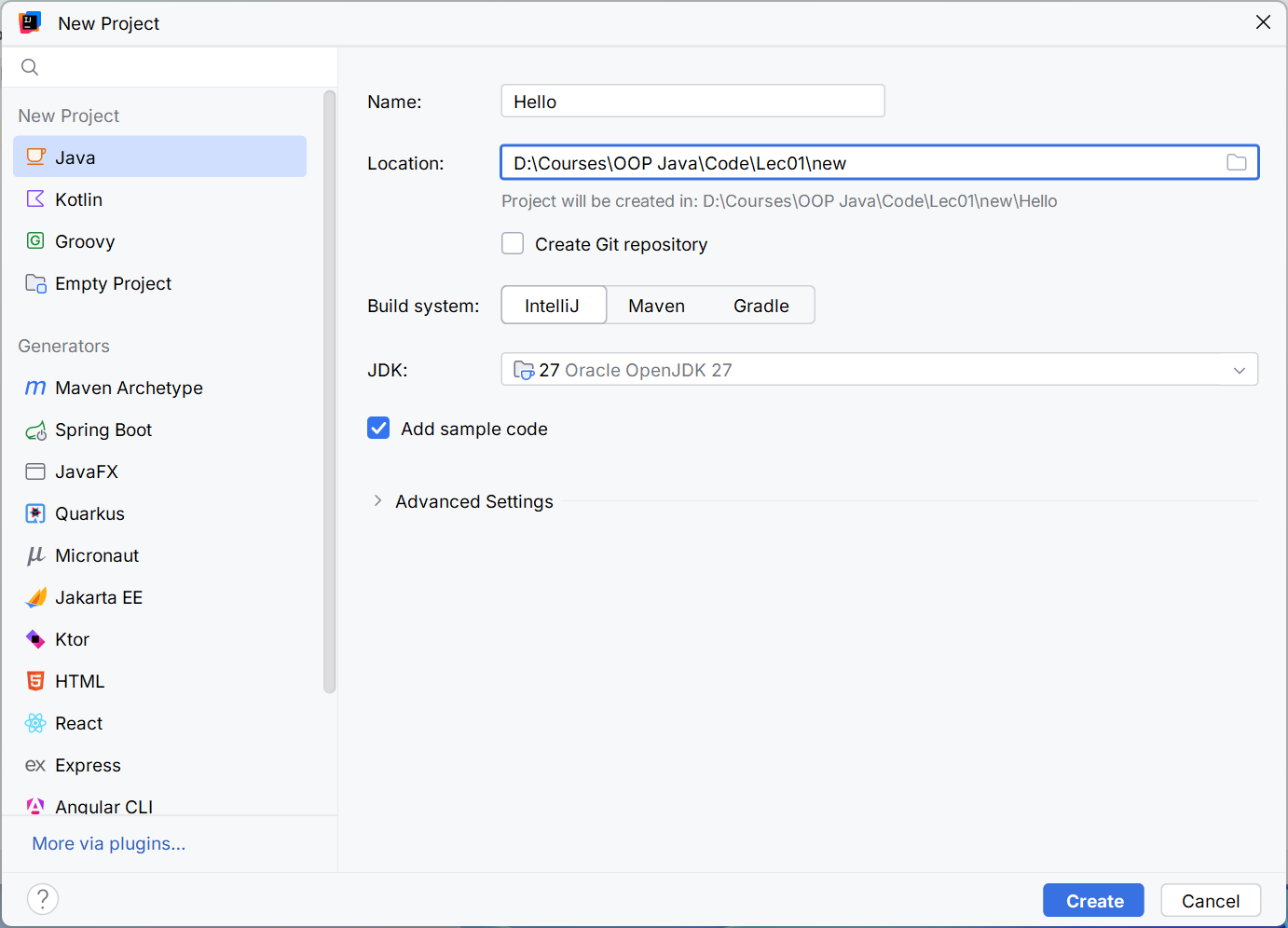
Figure 1.4. Creating a Java project with JDK 27
Open src/Main.java. The green button next to main runs that class. The Run window displays the output and exit code. If an old class runs, check the selected configuration instead of changing code at random.
Figure 1.5. Source files, settings, and compilation output
src contains source code, and out contains generated classes in a project using the IntelliJ build system. .idea contains IDE settings. Maven has a different structure: src/main/java and target. Do not rename directories by analogy with other systems without changing their configuration.
Set arguments in the Program arguments field under Run → Edit Configurations…. JVM options have their own VM options field. The working directory determines the base for relative paths; it does not necessarily match the directory containing a particular Main.java file.
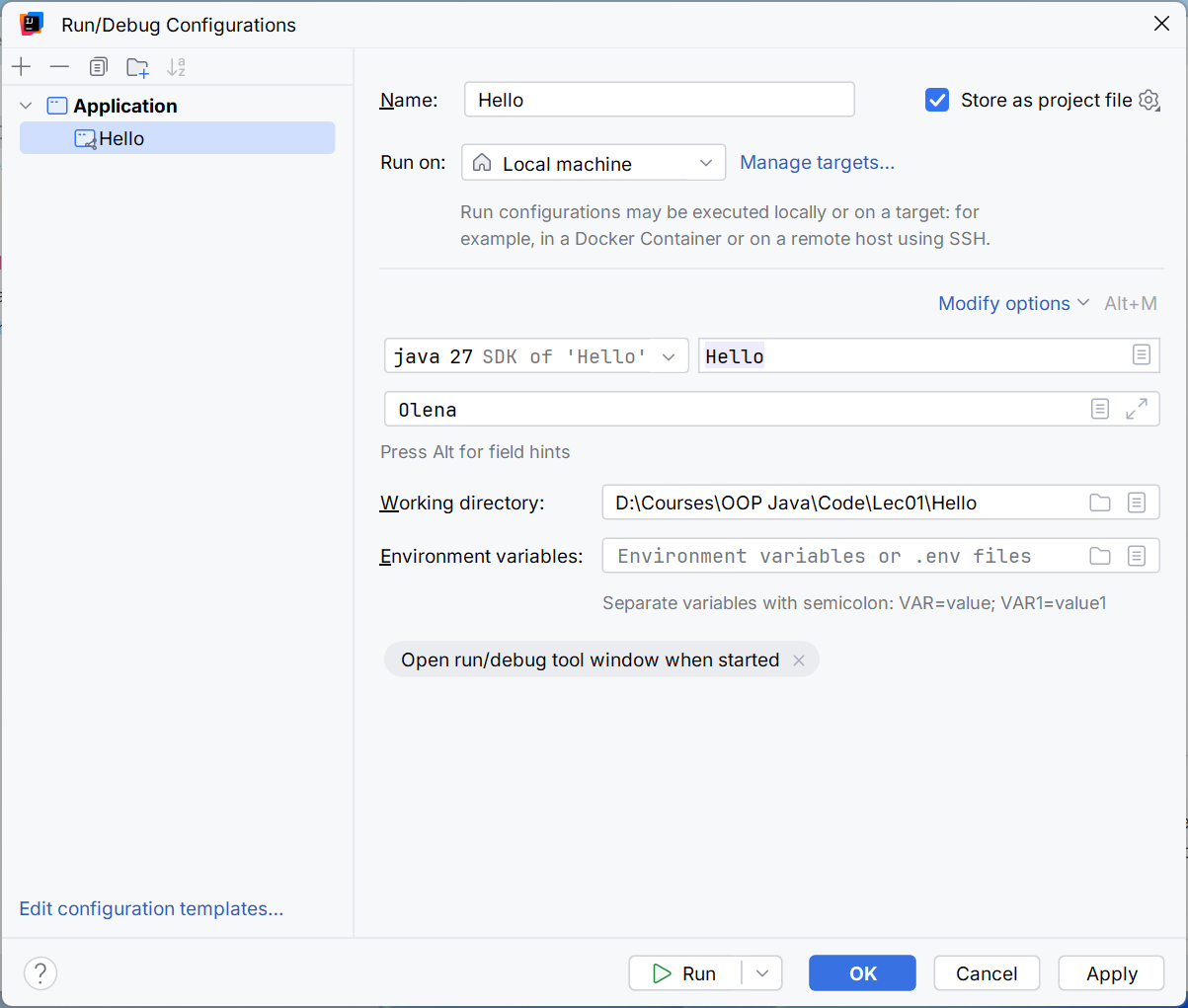
Figure 1.6. Arguments and working directory for a run
Example 3. Environment information
java
public class EnvironmentInfo {
    public static void main(String[] args) {
        System.out.println("Java: " + Runtime.version());
        System.out.println("Vendor: "
                + System.getProperty("java.vendor"));
        System.out.println("OS: "
                + System.getProperty("os.name"));
        System.out.println("Working directory: "
                + System.getProperty("user.dir"));
    }
}
The build number, OS, and directory depend on the run. The expected invariant is major version 27. Compare the IDE and terminal: different working directories explain many file lookup errors you will encounter later. Do not publish screenshots containing personal paths.
JShell as an exploration tool
The jshell command opens an interactive environment. You can evaluate an expression, declare a variable, inspect its value, and test an assumption. A session is useful for a short experiment but does not replace a saved, reproducible project.
jshell> int count = 7;
count ==> 7
jshell> count * count
$2 ==> 49
jshell> Math.sqrt(2)
$3 ==> 1.4142135623730951
jshell> /vars
jshell> /exit
Temporary variable numbers depend on the preceding session. Record the expression you checked and your conclusion in the report, rather than treating $2 as a permanent API identifier. The /help command explains the available shell commands.
Example 4. Room area
java
import java.util.Locale;

public class Room {
    public static void main(String[] args) {
        double length = 5.2;
        double width = 3.5;
        double area = length * width;
        double perimeter = 2 * (length + width);
        System.out.printf(Locale.US, "Area: %.2f m2%n", area);
        System.out.printf(Locale.US, "Perimeter: %.2f m%n",
                perimeter);
    }
}
Output: Area: 18.20 m2, then Perimeter: 17.40 m. All lengths are given in meters. An explicit locale makes the decimal point reproducible. Two decimal places in the output do not change the internal double value. The dimensions in this example are constant input data; the next topic adds input and boundary checks.
Local Git repository
Git stores a history of coherent changes. It is not a backup of the entire disk and does not check formulas for correctness. Each commit should contain a logically complete step that you can explain.
Official guide: https://git-scm.com/book/en/v2. After installing, check git --version. Set the author's name and address according to course rules; local configuration for the specific repository is enough for a learning exercise.
powershell
git init -b main
git config user.name "Course Student"
git config user.email "[email protected]"
A .gitignore file for a simple IntelliJ project:
out/
*.class
.idea/workspace.xml
This is not a universal template for all Java projects. In the Maven topic, you need to add target/; for Gradle, add .gradle/ and build/. Build system wrapper files, on the other hand, are usually stored in the repository. Do not commit passwords, tokens, or personal files, even to a private repository.
Figure 1.7. Git's three local areas
powershell
git status
git add src .gitignore
git diff --staged
git commit -m "Add greeting program"
git log --oneline
git add copies the selected state of a file into the index. If the file changes afterward, the commit contains the staged version, not automatically the latest one. Review git diff and git diff --staged before committing.
After the first working version, add a second small step, such as a name argument, and document how to run it in the README in a third commit. Do not create three commits with arbitrary spaces just to meet a count. The history should show the program's development.
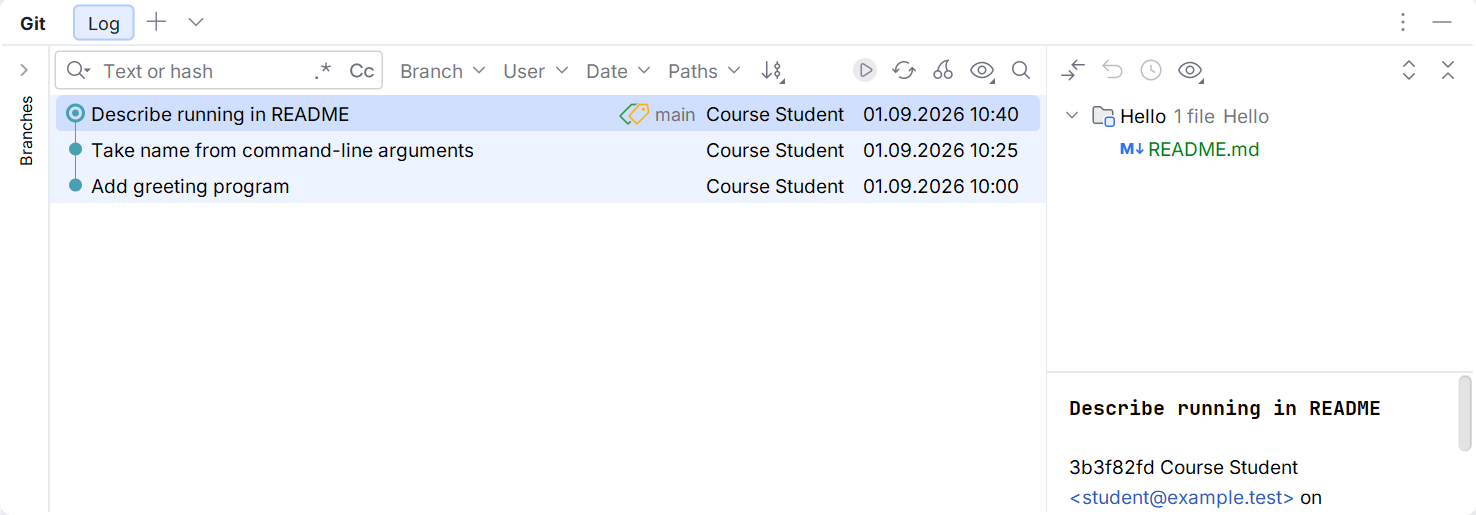
Figure 1.8. Meaningful history of a local project
In the Commit window, select files and write a message. The Git Log view lets you compare states. git restore discards uncommitted changes to a selected file: inspect the difference first. In coursework, do not use directory cleanup commands without understanding their scope.
A remote repository is a separate copy of the history. push transfers commits; clone creates a local copy. Local history is enough for the course; publishing on GitHub is a separate step governed by the instructor's rules. Changing repository visibility does not remove secrets from history that has already been published.