
English
Events and the UI thread
Event propagation and the UI thread
An event's path goes from the scene down to the target node (capturing, filters) and then back up (bubbling, handlers). addEventFilter is suitable for preliminary control, and addEventHandler for reacting. consume stops further propagation; use it only when there is a specific need, so as not to accidentally break keyboard navigation.
Figure 15.6. A filter sees the event before the target's handler
The JavaFX Application Thread handles events, layout, and scene updates. A long loop, Thread.sleep, or a JDBC query in setOnAction freezes the window. Computation or I/O is performed in a background Task; changes to live controls are brought back to the FX thread. Platform.runLater queues a short action, but by itself it does not move heavy work to the background.
Example 3. A simple graphics editor
A Canvas stores painted pixels; an individual stroke is not a node of the Scene Graph. To restore the drawing reliably after the canvas is resized, you need your own model of strokes. Here the size is fixed, and a ColorPicker and a Slider set the pen parameters.
java
package demo;

import javafx.application.Application;
import javafx.geometry.Insets;
import javafx.scene.Scene;
import javafx.scene.canvas.Canvas;
import javafx.scene.control.*;
import javafx.scene.layout.VBox;
import javafx.scene.layout.HBox;
import javafx.scene.paint.Color;
import javafx.stage.Stage;

public final class PaintMain extends Application {
    @Override
    public void start(Stage stage) {
        Canvas canvas = new Canvas(560, 300);
        canvas.setId("canvas");
        var pen = canvas.getGraphicsContext2D();
        ColorPicker color = new ColorPicker(Color.BLACK);
        Slider width = new Slider(1, 20, 3);
        width.setShowTickLabels(true);
        Button clear = new Button("Clear");
        clear.setId("clear");
        canvas.setOnMousePressed(event -> {
            pen.setStroke(color.getValue());
            pen.setLineWidth(width.getValue());
            pen.beginPath();
            pen.moveTo(event.getX(), event.getY());
        });
        canvas.setOnMouseDragged(event -> {
            pen.lineTo(event.getX(), event.getY());
            pen.stroke();
        });
        clear.setOnAction(event -> pen.clearRect(0, 0,
            canvas.getWidth(), canvas.getHeight()));
        VBox root = new VBox(10,
            new HBox(10, color, width, clear), canvas);
        root.setPadding(new Insets(12));
        stage.setTitle("Canvas");
        stage.setScene(new Scene(root));
        stage.show();
    }

    public static void main(String[] args) { launch(args); }
}
Dragging after a press draws a line; clearing removes the pixels but does not change the pen's color and width. An editor with Undo needs a list of commands or strokes, not an attempt to reconstruct the original objects from a finished raster image.
Animation should be defined with Timeline, KeyFrame, or Transition. A Timeline updates properties over time rather than relying on an exact number of frames. AnimationTimer receives the frame time and is suitable for simulations. After the corresponding scene is closed, a long-running animation must be stopped; otherwise it keeps references to objects that are no longer needed.
The LineChart, BarChart, and PieChart charts are meant for data, not arbitrary drawing. CategoryAxis represents categories, and NumberAxis a numeric scale. Label the axes, units, and series; an empty data set should produce an empty chart with an explanation, not a made-up zero measurement. Do not use color as the only way to distinguish series in a printed report.
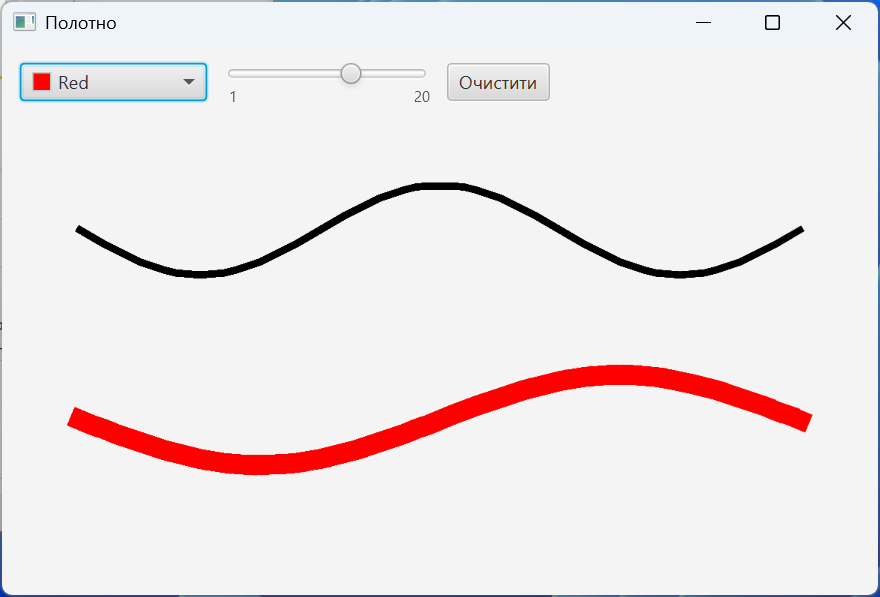
Figure 15.7. A canvas with strokes of different widths