
English
Your first JavaFX application
From a console algorithm to a graphical application
A console program usually determines the order of input itself. In a window, the user can click a button several times, change a previous field, or close the form. That is why a GUI is an event-driven program: it waits for events and runs short handlers that move the model and the interface into a new state.
JavaFX is a separate library for graphical JVM applications. It is not part of the standard JDK distribution. The OpenJFX project provides modules, native libraries for a specific operating system, and documentation. In this course, we use JavaFX 27 with JDK 27; Maven downloads the required platform artifacts. Documentation: https://openjfx.io/openjfx-docs/.
The Application class defines the lifecycle. launch starts the runtime only once per process. init is suitable for preparing configuration but not for creating a Stage or Scene. start(Stage) runs on the JavaFX Application Thread and creates the window. stop releases resources after the application finishes. You should not call start manually like an ordinary main.
Figure 15.1. The sequence of creating and closing an application
A Stage is an operating system window, a Scene is its content, and a Node is a node in the tree of elements. A button, a label, a container, and a Canvas are all nodes. A node has one parent: the same button cannot be placed in two containers at once.
A reproducible Maven project
Create src/main/java/demo and src/main/resources/demo. Java classes are stored in the first directory, and FXML and CSS in the second. Maven copies resources to the classpath; an absolute path on your own disk is not a portable way to find them. The complete POM below is suitable for all examples in this topic. To run a different example, change only mainClass.
xml
<project xmlns="http://maven.apache.org/POM/4.0.0"
  xmlns:xsi="http://www.w3.org/2001/XMLSchema-instance"
  xsi:schemaLocation="http://maven.apache.org/POM/4.0.0
    https://maven.apache.org/xsd/maven-4.0.0.xsd">
  <modelVersion>4.0.0</modelVersion>
  <groupId>ua.knu</groupId>
  <artifactId>fx-course</artifactId>
  <version>1.0.0</version>
  <properties>
    <maven.compiler.release>27</maven.compiler.release>
    <project.build.sourceEncoding>UTF-8</project.build.sourceEncoding>
    <javafx.version>27</javafx.version>
  </properties>
  <dependencies>
    <dependency>
      <groupId>org.openjfx</groupId>
      <artifactId>javafx-controls</artifactId>
      <version>${javafx.version}</version>
    </dependency>
    <dependency>
      <groupId>org.openjfx</groupId>
      <artifactId>javafx-fxml</artifactId>
      <version>${javafx.version}</version>
    </dependency>
  </dependencies>
  <build>
    <plugins>
      <plugin>
        <groupId>org.apache.maven.plugins</groupId>
        <artifactId>maven-compiler-plugin</artifactId>
        <version>3.16.0</version>
      </plugin>
      <plugin>
        <groupId>org.openjfx</groupId>
        <artifactId>javafx-maven-plugin</artifactId>
        <version>0.0.8</version>
        <configuration>
          <mainClass>demo.fx/demo.CounterMain</mainClass>
        </configuration>
      </plugin>
    </plugins>
  </build>
</project>
The module descriptor src/main/java/module-info.java exports the package for launching and opens the FXML controllers to the loader's reflection. opens does not replace exports: these are different kinds of access, discussed in the previous topic.
java
module demo.fx {
    requires javafx.controls;
    requires javafx.fxml;
    exports demo;
    opens demo to javafx.fxml;
}
text
mvn -version
mvn clean compile
mvn javafx:run
Check the JDK in the first command: the Project SDK setting in the IDE does not always match the terminal's JAVA_HOME. The error JavaFX runtime components are missing means that the launch path did not configure the JavaFX modules. Running through the Maven plugin helps reproduce the correct module path.
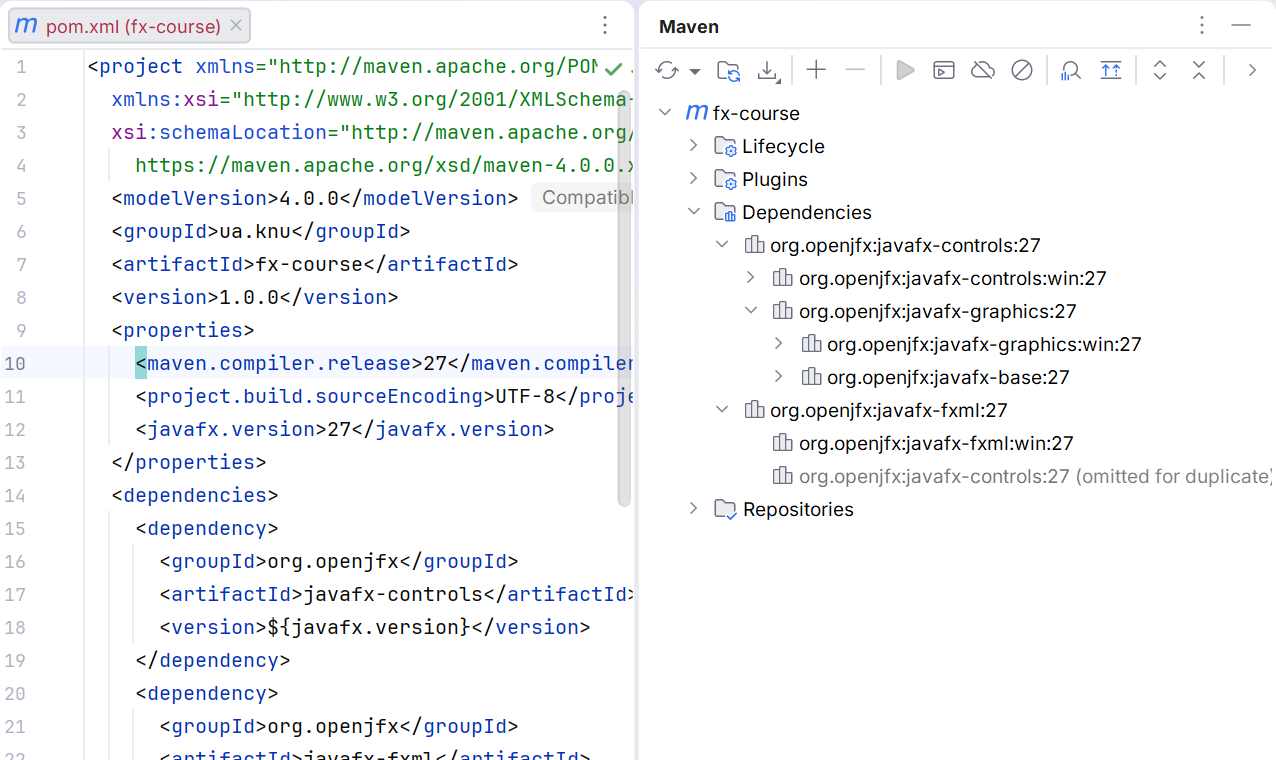
Figure 15.2. JavaFX 27 among the Maven project's dependencies
Example 1. A click counter
Let's create a self-contained class demo.CounterMain. The count variable belongs to the application object, not to a local handler. One button increases the value, and the second returns it to the initial state. The VBox layout arranges the elements vertically automatically.
java
package demo;

import javafx.application.Application;
import javafx.geometry.Insets;
import javafx.scene.Scene;
import javafx.scene.control.Button;
import javafx.scene.control.Label;
import javafx.scene.layout.HBox;
import javafx.scene.layout.VBox;
import javafx.stage.Stage;

public final class CounterMain extends Application {
    private int count;

    @Override
    public void start(Stage stage) {
        Label value = new Label("0");
        value.setId("value");
        Button add = new Button("Add");
        add.setId("add");
        Button reset = new Button("Reset");
        reset.setId("reset");
        add.setOnAction(event -> {
            count = Math.incrementExact(count);
            value.setText(Integer.toString(count));
        });
        reset.setOnAction(event -> {
            count = 0;
            value.setText("0");
        });
        VBox root = new VBox(12, value, new HBox(8, add, reset));
        root.setPadding(new Insets(16));
        stage.setTitle("Counter");
        stage.setScene(new Scene(root, 320, 160));
        stage.show();
    }

    public static void main(String[] args) { launch(args); }
}
After three clicks, the label contains 3, and after a reset, 0. The handler receives an ActionEvent but does not need its fields here. The lambda captures the value reference; it is the Label object that changes, not the value of the local variable. This complies with Java's effectively final rule for captured variables.
Figure 15.3. The tree of the first application
Most controls respond to semantic events. A button's setOnAction supports both the mouse and the keyboard. setOnMouseClicked is not an equivalent replacement: it binds the action specifically to the mouse. Labels should describe the action, and the focus order should match the input sequence. Do not convey state through color alone.