
English
Custom dialogs
Custom dialogs and their results
A dialog is a temporary window for a separate interaction. A modal dialog blocks interaction with the parent window, while a modeless dialog allows working in parallel. The parent determines the relationship between windows, ownership, and convenient positioning. QDialogButtonBox provides standard buttons and the accepted/rejected signals. https://doc.qt.io/qt-6/qdialog.html.
Calling dialog.exec() returns QDialog.DialogCode.Accepted or Rejected, but it starts a nested event loop. Qt recommends using the asynchronous open() with the accepted signal where possible: control returns immediately, so the dialog must be stored in an attribute or its lifetime ensured in some other way. show() usually displays a modeless dialog.
Figure 15.7. Confirming a dialog after validation
accept() means successful completion. Override it to recheck the fields, even if OK was disabled. reject() cancels the dialog without changing the business data. Do not save a half-filled record to the database on every keystroke while the user can still cancel the form.
Standard dialogs
QFileDialog.getOpenFileName and getSaveFileName return a (filename, selected_filter) pair; an empty name means Cancel. The CSV (*.csv) filter helps with selection but does not check the contents. Read errors and an invalid file structure must still be handled. On Windows, use Path objects instead of concatenating paths.
QMessageBox.question returns a specific StandardButton: compare it with Yes or No, not with an arbitrary bool. warning and critical report problems. QInputDialog returns a value and a confirmation flag. For QColorDialog, check the color's isValid after Cancel; QFontDialog also returns a confirmation result.
Example 2. A product and a validated CSV import
The dialog accepts a name and a positive price in integer kopiykas up to 1000000. OK is enabled only for valid fields. The CSV file has the header name,price; the entire file is validated first, and only then is the list extended. An error in the last row does not partially add the preceding rows. An empty valid file with a header adds 0 records.
py
import csv
import sys
from pathlib import Path
from PySide6.QtWidgets import (
    QApplication, QDialog, QDialogButtonBox, QFileDialog,
    QFormLayout, QLabel, QLineEdit, QListWidget, QPushButton,
    QSpinBox, QVBoxLayout, QWidget,
)


class ProductDialog(QDialog):
    def __init__(self, parent: QWidget | None = None) -> None:
        super().__init__(parent)
        self.setWindowTitle("Product")
        self.name = QLineEdit()
        self.price = QSpinBox()
        self.price.setRange(0, 1_000_000)
        self.price.setSuffix(" kop.")
        self.message = QLabel()
        buttons = (QDialogButtonBox.StandardButton.Ok
                   | QDialogButtonBox.StandardButton.Cancel)
        self.buttons = QDialogButtonBox(buttons)
        form = QFormLayout(self)
        form.addRow("Name", self.name)
        form.addRow("Price", self.price)
        form.addRow(self.message)
        form.addRow(self.buttons)
        self.name.textChanged.connect(self.validate)
        self.price.valueChanged.connect(self.validate)
        self.buttons.accepted.connect(self.accept)
        self.buttons.rejected.connect(self.reject)
        self.validate()

    def validate(self) -> bool:
        valid = (bool(self.name.text().strip())
                 and self.price.value() > 0)
        ok = self.buttons.button(QDialogButtonBox.StandardButton.Ok)
        ok.setEnabled(valid)
        self.message.setText("" if valid else "Name and positive price")
        return valid

    def accept(self) -> None:
        if self.validate():
            super().accept()

    def product(self) -> tuple[str, int]:
        return self.name.text().strip(), self.price.value()


def read_products(path: Path) -> list[tuple[str, int]]:
    result: list[tuple[str, int]] = []
    with path.open(encoding="utf-8", newline="") as file:
        reader = csv.DictReader(file)
        if reader.fieldnames != ["name", "price"]:
            raise ValueError("Columns name,price are required")
        for row in reader:
            name = (row.get("name") or "").strip()
            price = int(row.get("price") or "0")
            if None in row or not name or not 1 <= price <= 1_000_000:
                raise ValueError("Invalid product")
            result.append((name, price))
    return result


class ProductsWindow(QWidget):
    def __init__(self) -> None:
        super().__init__()
        self.setWindowTitle("Products")
        self.items = QListWidget()
        self.status = QLabel()
        self.dialog: ProductDialog | None = None
        add = QPushButton("Add")
        add.clicked.connect(self.open_dialog)
        load = QPushButton("Import CSV")
        load.clicked.connect(self.import_csv)
        layout = QVBoxLayout(self)
        for widget in (self.items, add, load, self.status):
            layout.addWidget(widget)

    def open_dialog(self) -> None:
        self.dialog = ProductDialog(self)
        self.dialog.accepted.connect(self.add_product)
        self.dialog.open()

    def add_product(self) -> None:
        if self.dialog is not None:
            name, price = self.dialog.product()
            self.items.addItem(f"{name}: {price} kop.")

    def import_csv(self) -> None:
        name, _ = QFileDialog.getOpenFileName(
            self, "Products", "", "CSV (*.csv)"
        )
        if not name:
            return
        try:
            products = read_products(Path(name))
        except OSError, ValueError, csv.Error:
            self.status.setText("Could not read a valid CSV file")
            return
        for product, price in products:
            self.items.addItem(f"{product}: {price} kop.")
        self.status.setText(f"Imported: {len(products)}")


if __name__ == "__main__":
    app = QApplication(sys.argv)
    window = ProductsWindow()
    window.show()
    raise SystemExit(app.exec())
Entering Pen and 2500 produces the line Pen: 2500 kop.. A price of 0 and a name consisting of spaces keep the dialog open. Cancel adds nothing. A file with the rows Notebook,4000 and Pencil,1500 after the header adds two items. An invalid row or denied access shows a message and leaves the existing list unchanged.
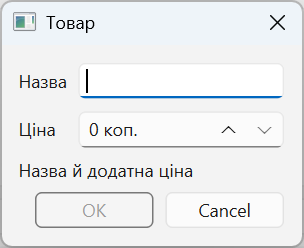
Figure 15.8. The product dialog with confirmation disabled
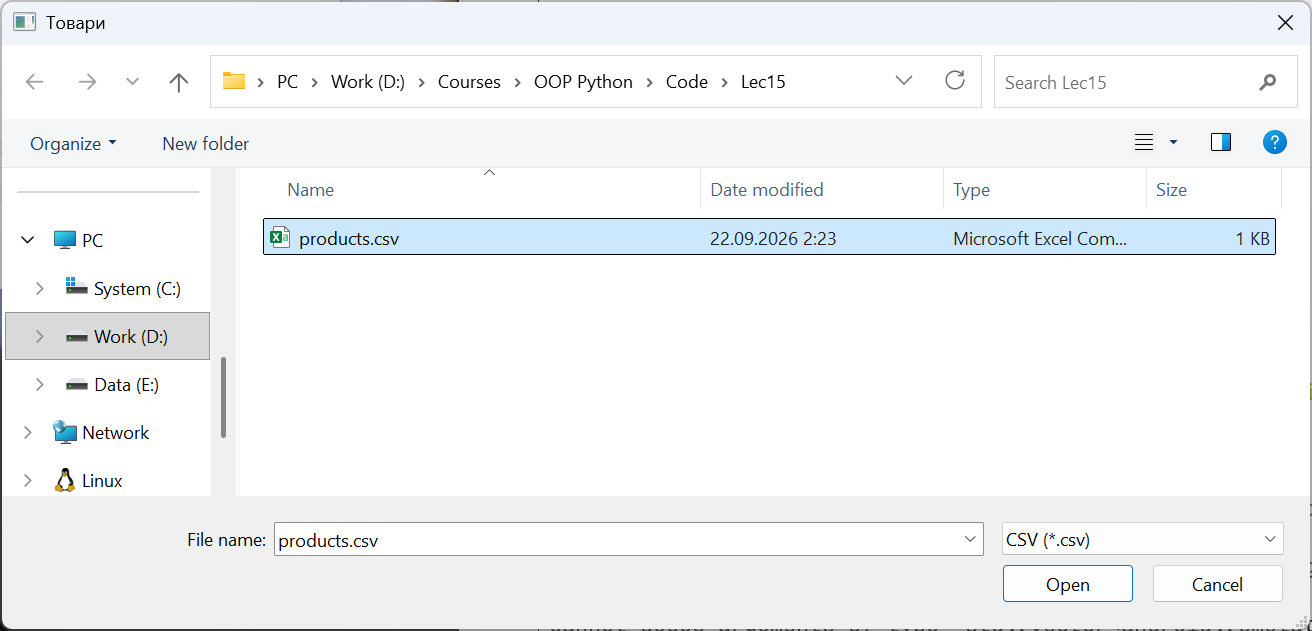
Figure 15.9. Choosing a CSV file to import