
English
Tables and DSL queries
Describing a table and its constraints
object Books : Table("books") is a schema description, not a collection of records. The property varchar("title", 120) describes a column. nullable() allows SQL NULL; default sets a default value; uniqueIndex() forbids duplicates at the database level. Validating a form before insertion is useful, but it does not replace database constraints.
integer, long, bool, decimal, date, and enumerationByName represent different types. Money is best stored as whole kopiykas or as an exact decimal, not as double. For a date without a time, java.time.LocalDate is suitable; for an instant across different time zones, you must choose a storage contract explicitly.
IntIdTable provides a default numeric key, which in the DSL is an EntityID<Int>. Its .value is an ordinary Int. In a custom Table, the primary key is set via PrimaryKey. Do not mix an external document number with a technical auto-generated key.
Example 1. Connection and schema
Each complete example in the lecture is a separate program. For transparent repetition, this example uses its own temporary database; in a real catalog, a persistent user path is passed instead. maxAttempts = 1 makes the educational error behavior unambiguous.
kotlin
import java.nio.file.Files
import org.jetbrains.exposed.v1.core.Table
import org.jetbrains.exposed.v1.jdbc.*
import org.jetbrains.exposed.v1.jdbc.transactions.transaction

object Shelves : Table("shelves") {
    val id = integer("id").autoIncrement()
    val name = varchar("name", 80).uniqueIndex()
    override val primaryKey = PrimaryKey(id)
}

fun main() {
    val path = Files.createTempFile("shelves-", ".db")
    val db = Database.connect(
        "jdbc:sqlite:$path?foreign_keys=on", "org.sqlite.JDBC"
    )
    transaction(db) {
        maxAttempts = 1
        SchemaUtils.create(Shelves)
        Shelves.insert { it[name] = "Poetry" }
        println("Shelves: ${Shelves.selectAll().count()}")
    }
    path.toFile().deleteOnExit()
}
text
Shelves: 1Creating the schema in a transaction is convenient for a first exercise. SchemaUtils.create is not a universal mechanism for updating an existing schema. Changing a Kotlin property does not automatically move data from the old column or fix old values.
For diagnostics, add addLogger(StdOutSqlLogger) to the transaction with the import org.jetbrains.exposed.v1.core.StdOutSqlLogger. The log helps you see the number of queries. In a production system, do not log personal data and parameters uncontrollably.
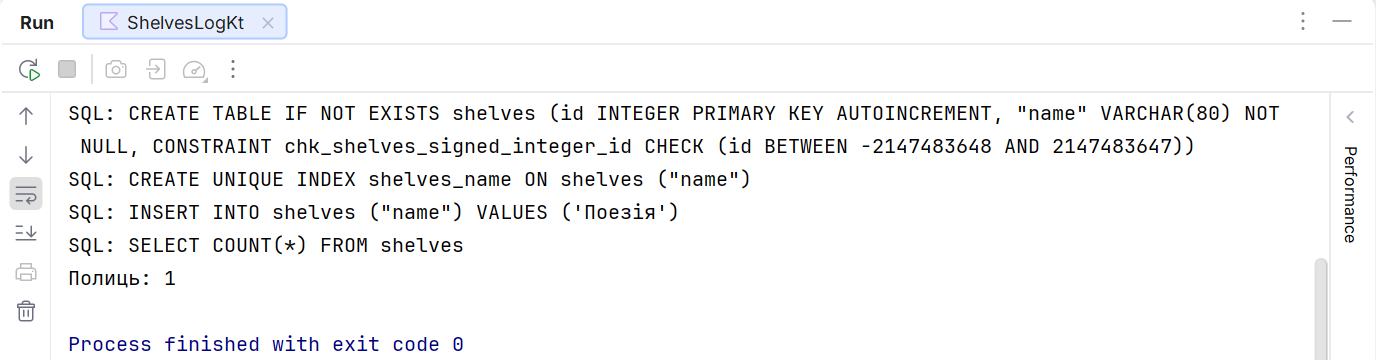
Figure 14.4. SQL generated by Exposed
DSL: create, read, update, and delete
insert returns the insertion result; the generated key is read from it. For an IntIdTable, insertAndGetId is convenient. batchInsert expresses inserting a set of rows, but actual batching depends on the driver. Do not assume that a thousand insert calls will automatically turn into one SQL query.
selectAll().where { ... } selects rows; select(columns) restricts the columns. The conditions eq, greater, like, and, and or form an SQL expression tree. Values are passed as parameters, not by concatenating an SQL string. If you need a literal search, remember that % and _ in LIKE are wildcard characters.
Without orderBy, the order of rows is not guaranteed. Even if SQLite returned them in insertion order today, an index or a new query plan can change the result. For pagination, specify a stable sort with a unique secondary key. limit without sorting does not mean "the newest" records.
update(where = { ... }) and deleteWhere { ... } return the number of affected rows. Check it for an operation by id: zero means the object is already gone. A mistake in the condition can change many rows; a preview and a transaction are useful for bulk educational operations.
upsert combines insertion and update on a key conflict. Its behavior depends on the dialect and the unique constraints. Before using it, determine exactly which key denotes "the same object" and which fields may be overwritten.